Is It Safe to Stream on Hotel Wi-Fi? What You Should Know
You check into your room, drop your bag, and open your laptop. The hotel Wi-Fi connects in seconds, and your favorite show is one click away. So is it safe to stream on hotel wifi? The short answer is yes, as long as you follow a few sensible habits.
Streaming itself is one of the safer things you can do on a hotel network. Your viewing data travels through encrypted connections inside official apps. The real risks come from the other things people do while connected. This guide explains how hotel Wi-Fi works and where the real dangers hide.
How hotel Wi-Fi actually works
The Wi-Fi in most hotels runs on a shared network. Dozens or hundreds of guests connect to the same system, often with one password for everyone. When you join, a captive portal usually appears first. That is the page asking you to accept terms or enter your room number before you get online.
A shared network means your device sits alongside strangers’ devices. Guest traffic passes through the hotel’s equipment, so the network operator can see which sites visitors open. This setup is normal for hospitality, and it works fine for everyday browsing. It simply deserves a bit more caution than your home network.
Speed is the other half of the story. Hotel connections split their bandwidth across every connected guest. An evening crowd can slow your stream to a crawl, even when the signal bars look full. If you want to know what your stream actually needs, read our guide on what internet speed you need for streaming.
Is it safe to stream on hotel wifi? The short answer
Yes, streaming on hotel Wi-Fi is generally safe. Modern streaming apps encrypt the connection between your device and their servers. That encryption scrambles your login details and viewing activity so other guests cannot read them.
The US Federal Trade Commission confirms this broader point about public networks. Its consumer guidance explains that most websites and apps now use encryption, which makes public Wi-Fi usually safe for everyday use. The guidance recommends strong passwords and two-factor authentication, plus keeping your software updated. Those habits do more for your safety than any single tool.
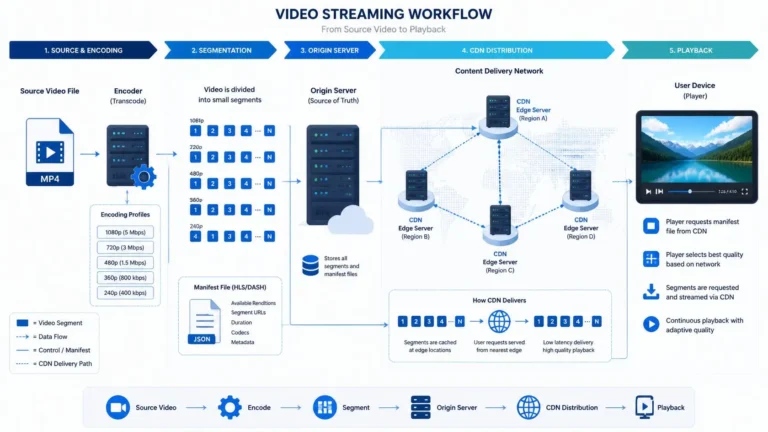
Streaming fits squarely into the “usually safe” category. You watch video inside an official app, and your card numbers are not involved at all. New to the basics? Our guide on how streaming works explains the technology behind it.
The real risks of a shared hotel network
Travelers who ask is it safe to stream on hotel wifi usually picture a hacker watching their screen. That specific scenario is rare. The realistic risks are more ordinary, and easier to prevent.
Fake networks are the first one. An attacker can copy the hotel’s network name with a small twist, like “Hotel_Guest_Free” instead of “Hotel Guest”. Your phone may join it automatically if auto-join is on. Confirm the exact network name with the front desk before you connect.
The second risk is what you type, since hotel Wi-Fi is a bad place for banking logins or card payments. You cannot verify who else watches the traffic, so save those tasks for your mobile data. The third risk is the oldest one: someone reading over your shoulder in the lobby. A little physical awareness costs nothing.
Download shows before you leave home
The simplest way to dodge hotel Wi-Fi trouble is to skip it for entertainment entirely. Download your shows and movies before you travel, then watch them offline in your room. No network means no network risk, and no buffering when the evening crowd logs on.
Most major streaming apps include a download button on each title’s page. Look for the downward arrow icon next to the episode or movie. Tap it while you are on your home Wi-Fi, and the title saves to your device. Not every title offers downloads, so grab your must-watch picks early.
Downloads do expire, so check the timing before a long trip. Some titles stay available for weeks, while others vanish within days of starting playback. Open the app the night before you leave and confirm everything is still there. Delete watched episodes afterward to free up space for the next trip.
Pick the right download quality
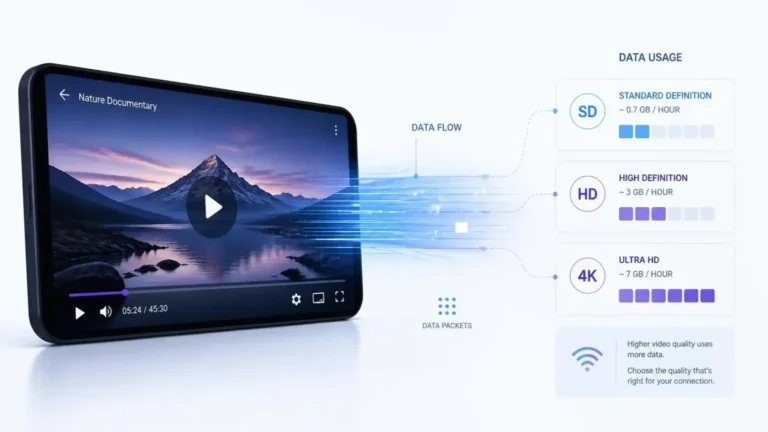
Download quality controls how much storage each title uses. Higher quality looks better on a tablet but eats gigabytes fast. Standard quality is plenty for a phone screen and lets you carry far more episodes.
The quality setting lives inside the app’s download options. Choose it once, and every future download follows the same rule. For a week-long trip, standard quality on a phone can hold an entire season without breaking a sweat.
Smart habits while you stream at the hotel
Small routines make a shared network much safer. Start by turning off auto-join for open networks in your phone settings. It should never connect to a hotel network without your say-so.
Use only official apps from the real app stores. A random “free movies” site found through a search can carry malware or phishing pages. The official Netflix, Disney+, or Prime Video app encrypts your session and shows exactly what you are paying for. If a title keeps stalling on weak hotel bandwidth, our article on why your stream keeps buffering explains the usual culprits.
Keep your apps and operating system updated before the trip. Updates close security holes that attackers on shared networks like to probe. Turn on automatic updates so you never have to think about it. Two-factor authentication on your streaming accounts adds one more lock on the door.
Keep sensitive logins off hotel Wi-Fi
Streaming is safe on hotel Wi-Fi, but banking is not the same activity. Treat the hotel network as fine for entertainment and off-limits for money. This one rule removes nearly all the meaningful risk.
Never type card numbers or bank passwords while connected to the hotel network. If a bill needs paying, switch to your mobile data first. Asking is it safe to stream on hotel wifi matters most with passwords involved, so keep the two activities apart.
The same caution applies to work email with sensitive attachments. Read the headlines if you must, but save the confidential files for a trusted network. The show can wait on hotel Wi-Fi while your finances travel over your carrier’s encrypted connection.
When your phone data is the better choice
Your phone’s mobile data deserves more credit than it gets. The connection between your phone and the cell tower is encrypted by default. Nobody in the hotel lobby shares it with you.
Use your data for anything involving logins, payments, or personal documents. A few minutes of banking over mobile data costs almost nothing in data allowance. The hotel Wi-Fi stays reserved for bandwidth-hungry streaming, where encryption already protects you. If you are unsure how much a streaming session consumes, see how much data streaming uses.
A personal hotspot splits the difference nicely. Your laptop rides on your phone’s encrypted mobile connection instead of the hotel’s shared network. Watch your data cap on long sessions, and switch back to hotel Wi-Fi for pure video watching.
Hotel TVs and your streaming accounts
Many hotels now put streaming apps right on the room TV. Logging into your personal account on that screen is convenient, and the risk is manageable. The danger is forgetting to log out when you check out.
Sign out of every app before you leave the room for the last time. The next guest should never find your profile waiting on the home screen. If the TV makes signing out awkward, remove the TV from your account’s device list through the app on your phone instead.
An even safer option is to skip the hotel TV’s apps entirely. Bring a short HDMI cable or a travel streaming stick and play from your own device. The logins and updates stay in your hands, and you choose when to sign out. The hotel screen becomes a simple display, which is exactly what you want.
Stream smart and relax
You now have a complete picture of hotel streaming safety. The network is shared and the apps are encrypted, and your habits fill the gap between those two facts. Download ahead when you can and verify the network name. Money matters stay on mobile data.
So the next time someone asks you is it safe to stream on hotel wifi, you will have a confident answer. Yes, it is, when you stream smart. Press play and enjoy your evening.